
Щоб передавати залишки товарів на інші системи — ERP, CMS, самописні сайти тощо — у keyCRM можна налаштувати вебхук. Система автоматично надсилатиме оновлені дані про залишки щоразу, коли вони змінюються.
Додавання вебхука
Перейдіть до «Налаштування» → «Товари» → вкладка «Склад» та в блоці «Webhooks» натисніть «+Додати Webhook».
У вікні заповніть поля:
- Назва — напишіть зрозумілу назву, краще вказати куди саме відправляються дані з цього вебхука;
- Посилання на Webhook — введіть URL-адресу вебхука, куди будуть відправлятися дані методом POST;
- Склади — оберіть склад з якого будуть відправлятися залишки. Якщо обрати декілька, то будуть братися сумарні по ним. Якщо залишити пустим, то будуть братися загальні, по всім складам.
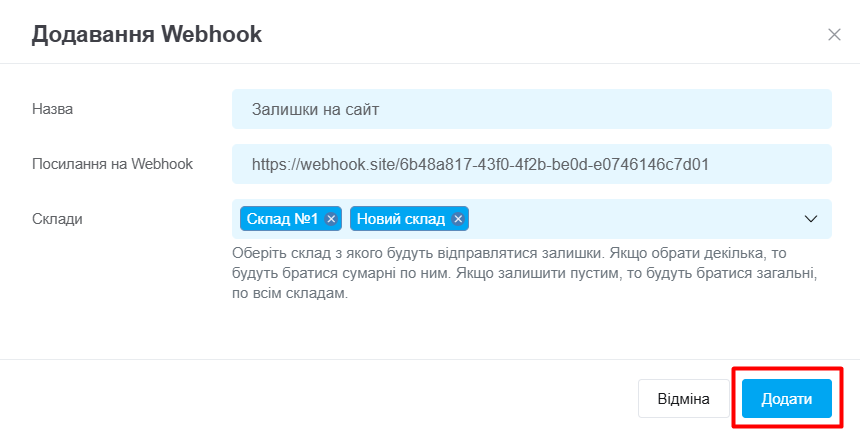
Натисніть «Додати», вебхук збережеться в список з можливістю відредагувати або видалити.
Щоб зберегти налаштування, натисніть «Зберегти» внизу сторінки, і дані почнуть відправлятися на доданий вебхук:

Як працює передача залишків на вебхук
Залишки надсилаються в момент їх зміни у KeyCRM, а саме після:
- переведення замовлення у статус, у якому товар резервується чи списується зі складу або скасування резерву та списання;
- створення або редагування документів: оприбуткування, інвентаризації товарів;
- імпорту залишків (можна використовувати завантаження початкових залишків);
- зміни залишків через API;
- редагування залишків вручну.
Після додавання нового вебхука, залишки, які вже збережені у товарах, не будуть передані. Лише при наступних змінах по вказаному списку подій, оновлені дані про залишки будуть передаватися.
Інформація яка відправляється по зміні залишків у форматі JSON:
[
  {
    "offer_id": 130827,  // ідентифікатор варіанту товара
    "sku": "a001-56",  // артикул
    "in_stock": 16,   // всього залишку товара
    "in_reserve": 3   // яка кількість із всього залишків знаходиться в резерві
  }
]
Щоб визначити доступний залишок товарів для продажу з урахуванням резерву, ви можете при отриманні даних від загального залишку "in_stock" віднімати резерв "in_reserve".
