Listings represent your products on a marketplace. You can create products in keyCRM from listings and use them for inventory management, send them to manufacturing, add products to orders, and view product analytics.
Importing listings from Etsy
After connecting Etsy, all your listings will automatically appear under «Catalog» → «Listings»:
- Import speed: approximately 1,000 listings in five minutes;
- Automatic updates: once a week;
- Manual updates: once a day by clicking «Load listings».

What information is imported into listings
When importing listings from Etsy, the following information is saved:
- The name of the source where the product is listed;
- The product number on the source;
- The product image (only the first, main image is imported);
- The product name;
- The retail price, including products with variants;
- The product SKU — if a product has variants, each variant must have a unique SKU;
- The product properties (variants) — for example, if a product is available in ten colors, these options will appear as variants;
- The retail price of each variant:

The color of the check mark next to the source name indicates whether products have been created from the listing in the catalog:
- Green — all product variants from the listing have been created;
- Black — no product has been created from the listing;
- Yellow — products have been created for only some variants in the listing.
What you can do with listings
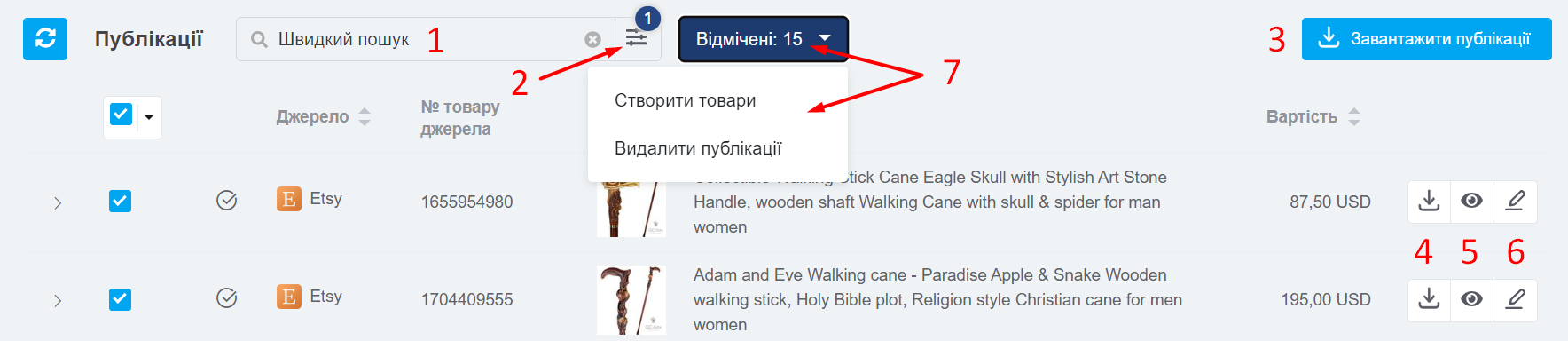
Click a column heading to sort the list of listings. You can also:
- Run a quick search by name or SKU;
- Filter listings by SKU, source product number, source, and product link;
- Load listings from all sources (available once a day);
- Resynchronize an individual product listing from the source;
- View the product on the source;
- Edit the product on the source — its page will open in the Etsy administration panel;
- Select listings in the list to create products or delete listings:
What information is updated in listings
When listings are resynchronized, the following information is updated:
- Product name;
- Retail price;
- SKU;
- Image;
- Properties.
Once all listings have been imported, you can create products in keyCRM and use them for inventory management, send them to manufacturing, add products to orders, and view product analytics.
