SMS is the most effective way to communicate with customers, allowing you to convey important information concisely.
To send messages directly from the keyCRM interface, set up integration with one of the SMS messaging services:
-
AlphaSMS;
-
TurboSMS;
-
SMS Club;
-
SMS-fly.
Sending SMS messages from the chat section
To message a customer, go to the «Convos» section and click «Send a message» above the list of chats on the left side of the window.
In the window that opens, fill in the fields:
-
Contact — find the customer to whom you are sending the message (you can search by name, phone number, or email);
-
Channel — select the SMS service from the list of connected services;
-
Contact Address — if the customer has multiple phone numbers, select the one to which you want to send the message;
-
Message — enter the SMS text or select a message template by clicking the lightning bolt:
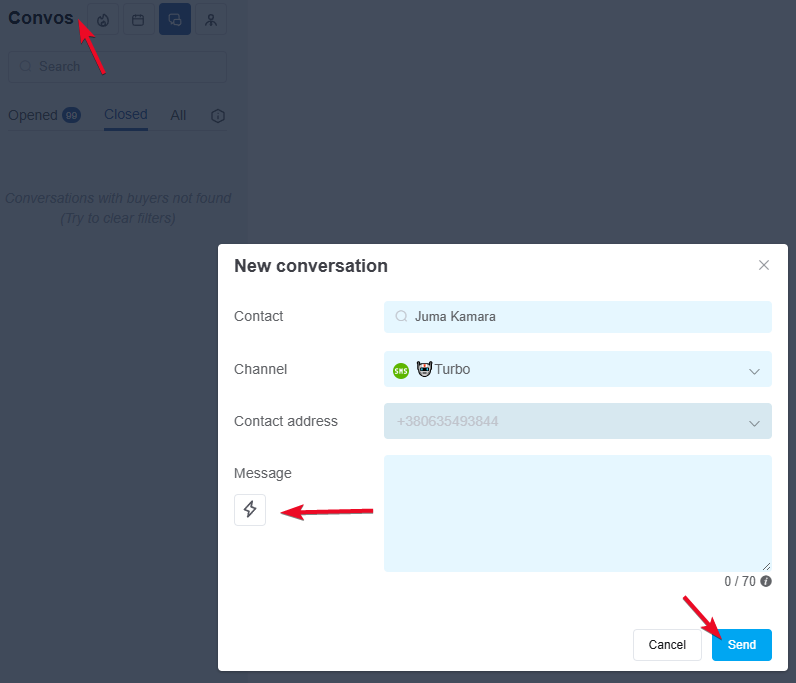
Click «Send», and the message will be sent immediately to the specified phone number.
Sending SMS messages via order cards, pipelines, and customers
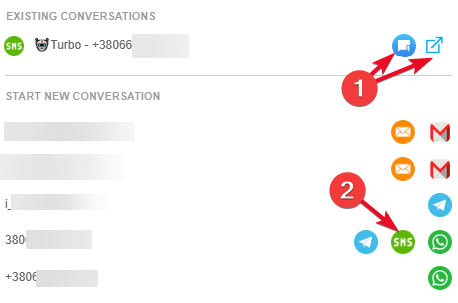
In the order, pipeline, or customer card, clicking the «Write» button opens a window where:
-
Existing conversations are displayed, with the option to write a message immediately or open a conversation in a new tab;
-
Start a new conversation from a connected communication channel. To do this, click the corresponding icon next to the customer’s number you want to message:
Features of SMS chats
Here are a few important points to note when working with SMS chats:
-
All SMS chats are always placed in the «Closed» tab;
-
all SMS messages sent to a customer at a single number will always be stored in a single chat;
-
you can view the history of sent SMS messages both within the chat itself and in the customer’s profile, under the «Communications» tab;
-
if a single message sent to a client encounters an error during transmission, that chat is automatically deleted.
Now that you know how to send SMS messages manually, you can set up automated messaging for virtually any scenario using message templates.
