If you sell through Instagram, integration with keyCRM will allow you to:
-
conduct all communications with customers directly in the CRM account: messages, comments, replies to stories, mentions, and reactions;
-
immediately see customer data and easily create a buyer card or find them in the database;
-
place orders or create pipeline cards directly from the dialogue.
As a result, messages are processed faster and the risk of losing orders is reduced.
If you haven't done so yet, we recommend that you follow all the steps in the instructions for preparing Instagram before connecting.
Connecting Instagram to keyCRM
Go to «Settings» → «Communications» → the «Chats / SMS / Email» tab and click the «Add new channel» button.
In the window that opens, fill in the fields on the «General» tab:
-
Title — any name for the channel that is convenient for you;
-
Channel — Instagram;
-
Comments — enable if you need to synchronize comments on posts and respond to them from CRM.
To connect your account:
-
Click «Continue with Facebook». If the window does not open, make sure that pop-up windows are allowed in your browser;
-
At the beginning of the authorization process, Facebook may ask you to log in or switch from the page to your profile. To connect, use a profile with administrator rights for the public page associated with the desired Instagram account.
-
During authorization, grant access to all available companies, pages, and accounts.
This is only necessary for convenient connection of other pages in the future — the CRM will receive notifications only from the page you select in the next step. -
After completing authorization, select the Facebook page to which the desired Instagram is linked in the channel window in the CRM.
After saving the channel, it will be impossible to change the page.
Each Instagram account is connected as a separate channel.
To connect a new account, follow the same steps, but in the authorization window, select «Reconnect» instead of reissuing access.
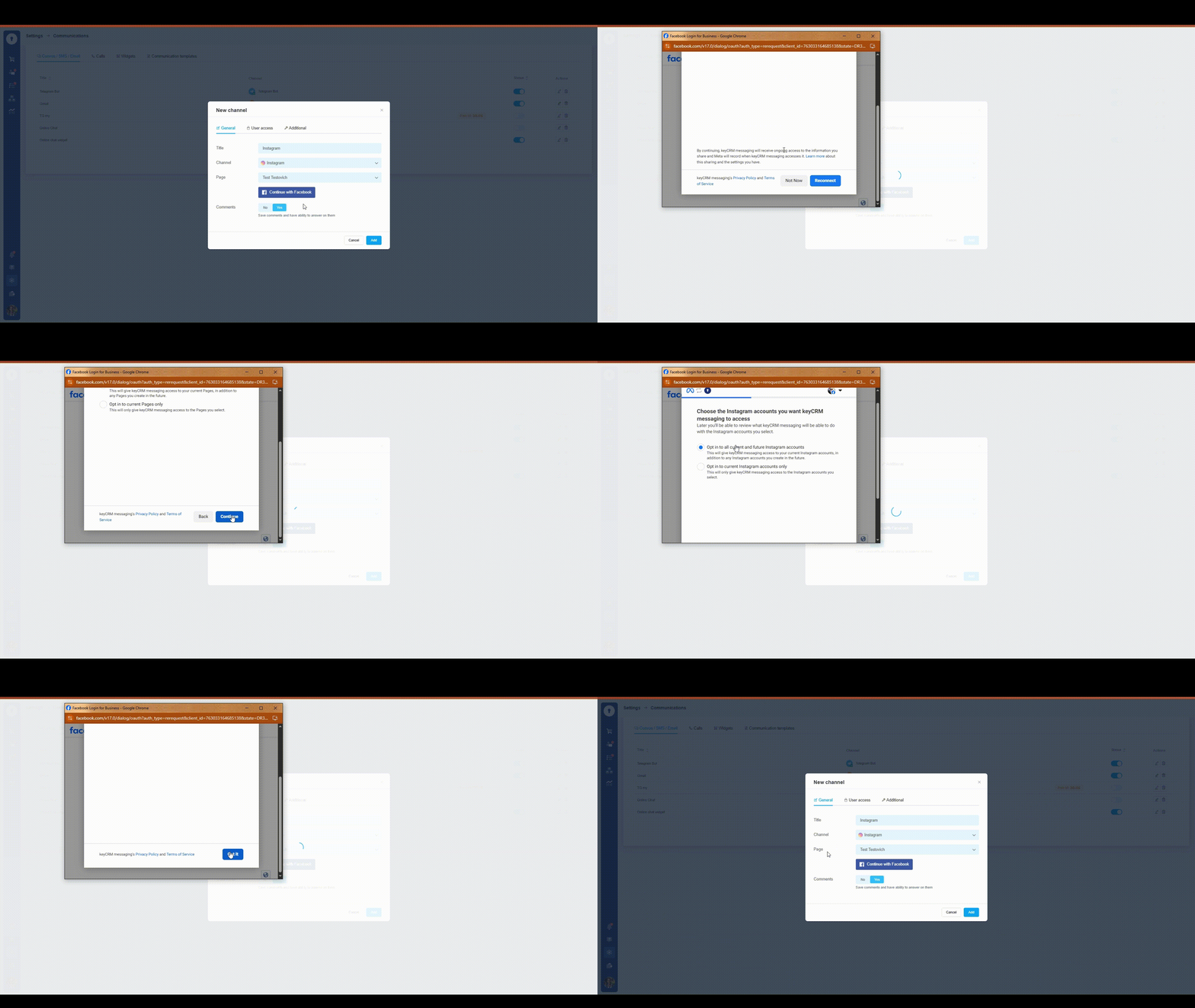
This completes the channel connection — save the channel so that new messages start coming into CRM instantly.
If necessary, you can also configure user access to the channel and additional settings for its operation.
To ensure that the communication channel works stably and without interruptions, we strongly do not recommend:
-
change the password of the Facebook account used for authorization;
-
change the two-factor authentication settings for this Facebook account;
-
changing previously granted access to companies, pages, or Instagram accounts during authorization in other channels;
-
changing the link between your Instagram account and another Facebook page;
-
violating Meta's rules, which may result in your page or Instagram account being blocked.
As a result of such actions, the integration may temporarily stop working or become unavailable without the possibility of recovery. For more information on how to resolve such situations, see section 15 of the «Instagram FAQ».
