SkladUSA is an intermediary that lets you receive PayPal payments. Connect it to keyCRM to view a list of order payments and PayPal & SkladUSA fees.
How to get your API key and UserID
- To get your API key, contact SkladUSA support.
- To get your UserID, sign in to your SkladUSA account and click «Profile» in the upper-right corner. Copy your UserID from the browser’s address bar.
For example: In the URL https://system.skladusa.com/ru/admin/user-profile/1231/show, the UserID is 1231. Your UserID will be a different number.
Connect SkladUSA statements
Go to «Settings» → «Finance» → the «Payment services» tab, then click «Add payment service».
In the window that opens:
- Name — enter a name that is convenient for you;
- Integrate with — select SkladUSA from the list;
- UserID — enter the UserID you copied from your SkladUSA profile;
- API key — enter the API key provided by SkladUSA support;
- Select the payment type to use when saving payments;
- Save expenses — enable this option if you want expenses to be saved in the order;
- Select the payment types for PayPal and SkladUSA fees:
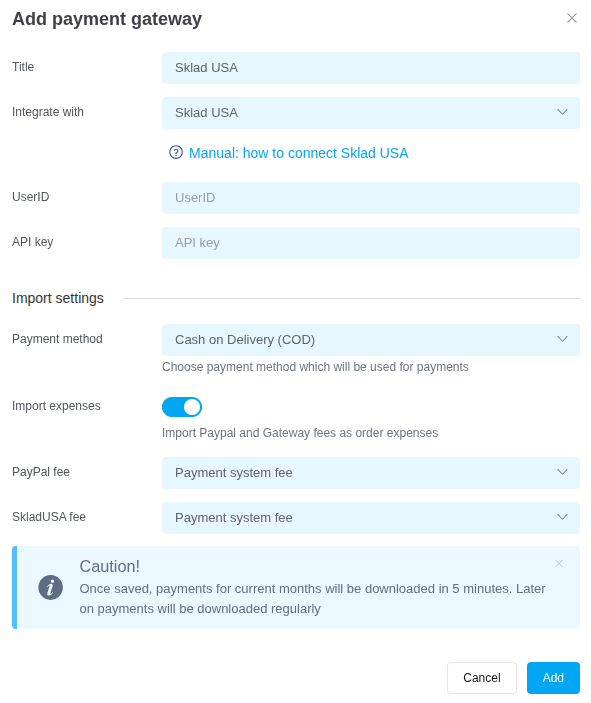
After completing the required fields, click «Add». The payment service will appear in the list.
All payment statements for fulfillment orders appear in «External transactions». You can add them to general expenses or order expenses.
Tags: SkladUSA, PayPal, Paypal, sklad usa, skladusa, Sklad USA
