Expense management is a key aspect of the effective functioning of any business. In addition to expenses for specific orders, delivery, or packaging, there are general expenses for salaries, advertising, transportation, office rent, and product shortages, etc.
Keeping track of expenses allows you to generate more detailed and accurate financial reports for effective business management and profit analysis.
How to add general expenses
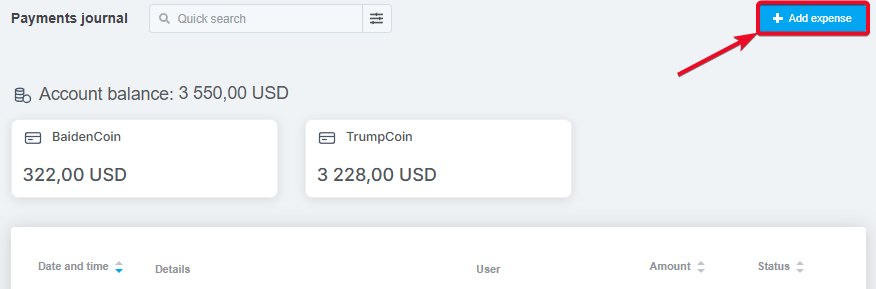
Navigate to the «Sales» → «Payments journal» section and click the «Add expenses» button in the upper right corner:
In the window that opens, fill in the fields:
-
Type of expense — select the appropriate expense type from those previously created;
-
Source — if these expenses belong to a specific source (for example, advertising expenses), select it;
-
Amount and currency — if a source is selected, the currency will change to the source currency by default;
-
Date and time — the date and time automatically recorded when the expense was added can be changed as needed;
-
Description — leave a comment if necessary, or leave it blank;
-
External transactions — select a transaction to link it to the expense if you have connected statements from payment services.
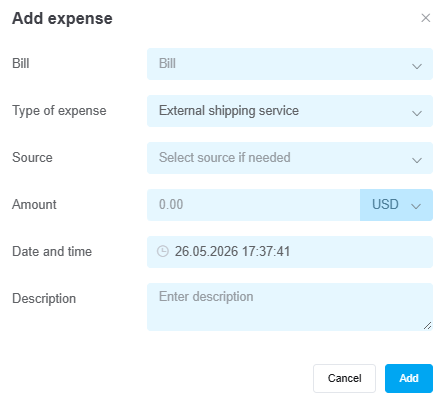
After that, click «Add», and the expense will be created immediately and displayed in the list in the payments journal.
How to edit and remove general expenses
There is no option to edit general expenses – this is to prevent employees from manipulating the numbers and adjusting the statistics to the desired number.
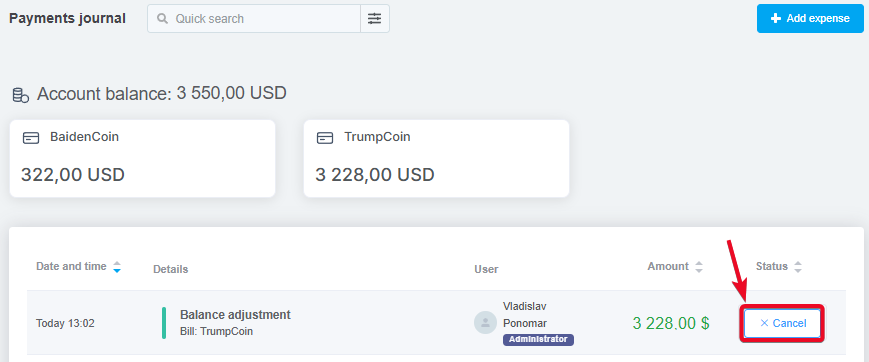
You can only cancel general expenses. To do this, hover your cursor over any place in the expense line, and a «Cancel» button will appear in place of the «Paid» icon.
Now you can add general expenses, view statistics on them in financial reports and analytics by source, if they are linked to them.
