NovaPay is a payment service that allows you to quickly and conveniently accept online payments and supports cash-on-delivery payments for orders shipped through Nova Poshta branches.
keyCRM offers integration specifically with NovaPay’s acquiring services. Once connected, you’ll be able to generate invoices in orders with automatic settlement upon payment.
Connecting NovaPay to keyCRM
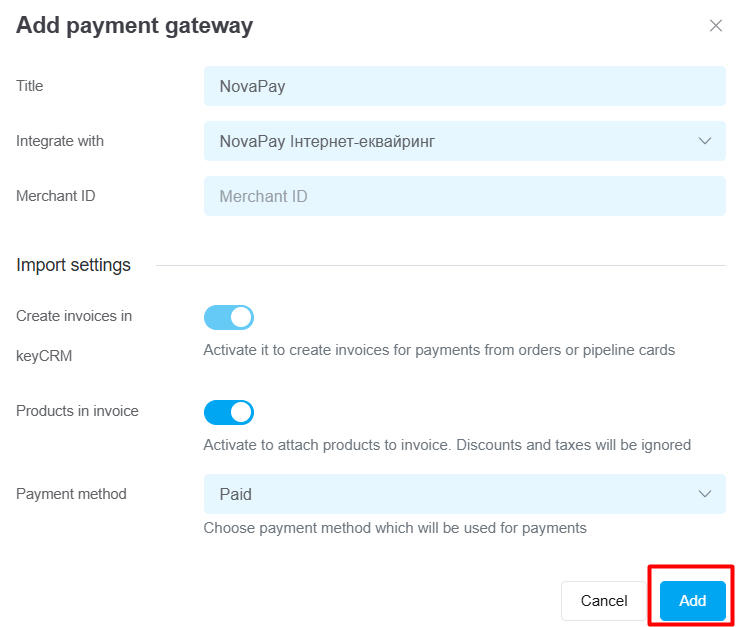
Go to the «Settings» → «Finance» → «Payment gateways» section and click the «Add payment gateway» button.
In the window that opens:
-
Title — enter a descriptive name for the payment gateway;
-
Integrate with — select NovaPay Інтернет-еквайринг;
-
Merchant ID — available from NovaPay;
-
Enable the «Create invoices in keyCRM» toggle in the «Import settings» section and fill in the fields:
-
Payment method — select the payment type for the payment, which will be set as the default when creating a payment;
-
Products in invoices — enable this to transfer product data.
Click the «Add» button to save your settings.
Once you've added the payment service, it will appear in the list, and you can start issuing invoices for payment.
Invoicing
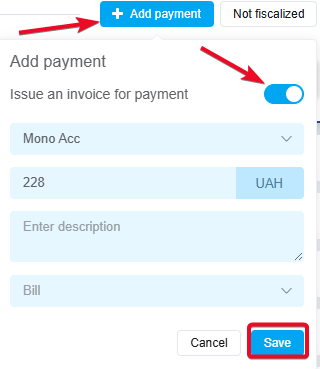
After configuring the settings, you can generate an invoice for payment within an order or a pipeline card. To do this:
-
In the payment section, click «+ Add Payment»;
-
Toggle the «Issue an invoice for payment» switch;
-
Select the payment service from which the invoice will be issued;
-
Enter the amount to be paid;
-
Optionally, you can leave a description for this payment in the system (it is not included in the invoice and is used for internal notes);
-
Click «Save».
How to manage invoices
After creating an invoice, the corresponding payment will be added to the payments in the order or in the sales pipeline card. You can:
-
Track the payment status, which automatically updates after the invoice is paid;
-
Copy the payment link to send to the buyer. The link is valid for 1 week;
-
Cancel the created invoice. Hover over the payment status, and the «Rejected» button will appear.

